

PesaPal
Connect PesaPal to PayLexer to accept card payments, mobile money, and bank transfers across East Africa.
PesaPal is an East Africa-focused payment gateway providing payment processing for businesses operating in Kenya, Uganda, Tanzania, Rwanda, Zambia, Malawi, and other African markets. It supports card payments, mobile money (M-Pesa, Airtel Money, MTN), and bank transfers.
- Supported Regions (Merchant Accounts): Kenya, Uganda, Tanzania, Rwanda, Zambia, Malawi, Zimbabwe - view full list
- Supported Currencies: KES, UGX, TZS, RWF, ZMW, MWK, USD
Supported Features
- One-time payments
- Refunds
- Real-time payment status updates
- Mobile money (M-Pesa, Airtel Money, MTN)
- Card payments
- Bank transfers
Before You Start
Make sure you have:
- PesaPal Account – Don't have one? Sign up for PesaPal →
- PayLexer Account – Required to configure the integration. Create your account →
- A website where you want to integrate
Looking for a different payment processor? View all supported gateways →
Configuring PesaPal
You need a Consumer Key and Consumer Secret from PesaPal for this integration.
Getting API Credentials
Log in to PesaPal
Log in to your PesaPal Dashboard.
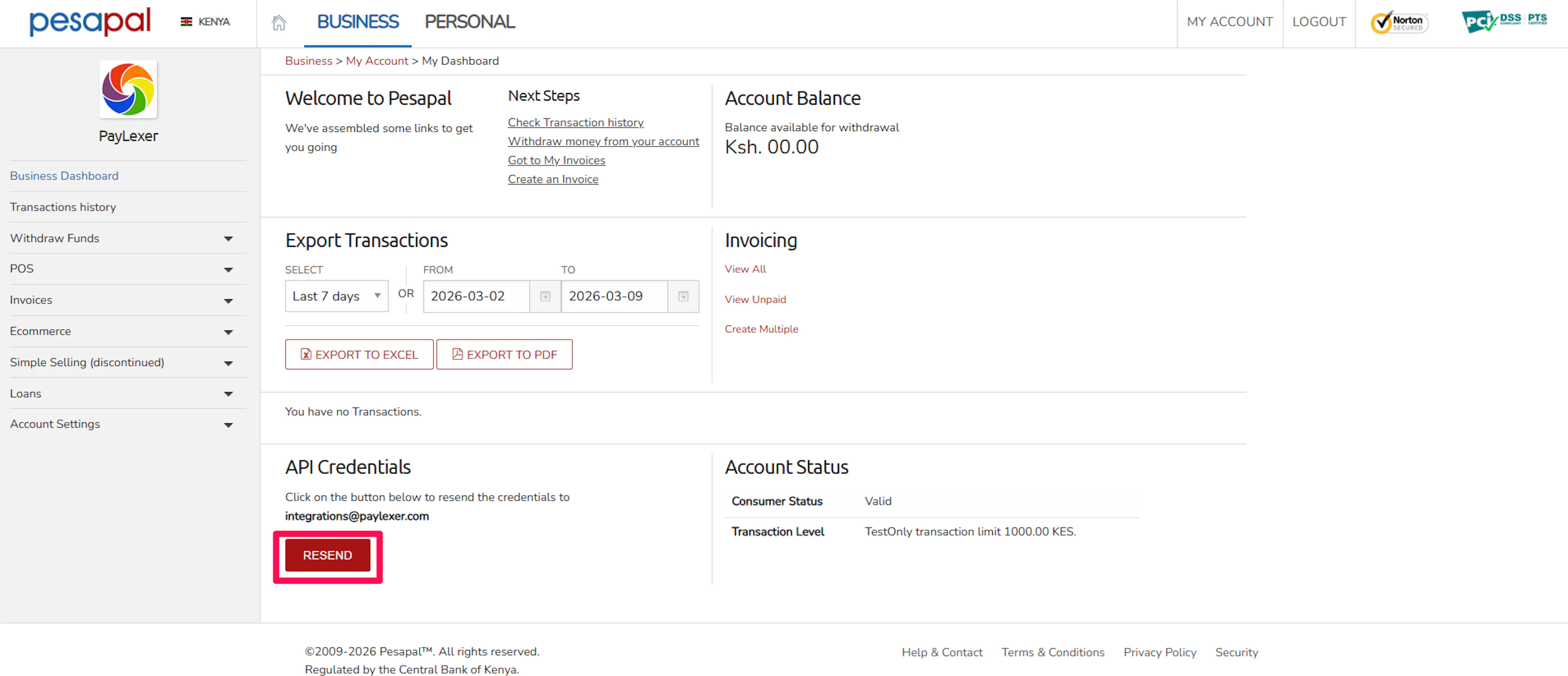
Navigate to API Settings
Go to** API Credentials** or Developer section and click Resend.
Copy your credentials
Copy your Consumer Key and Consumer Secret you receive in your mail.
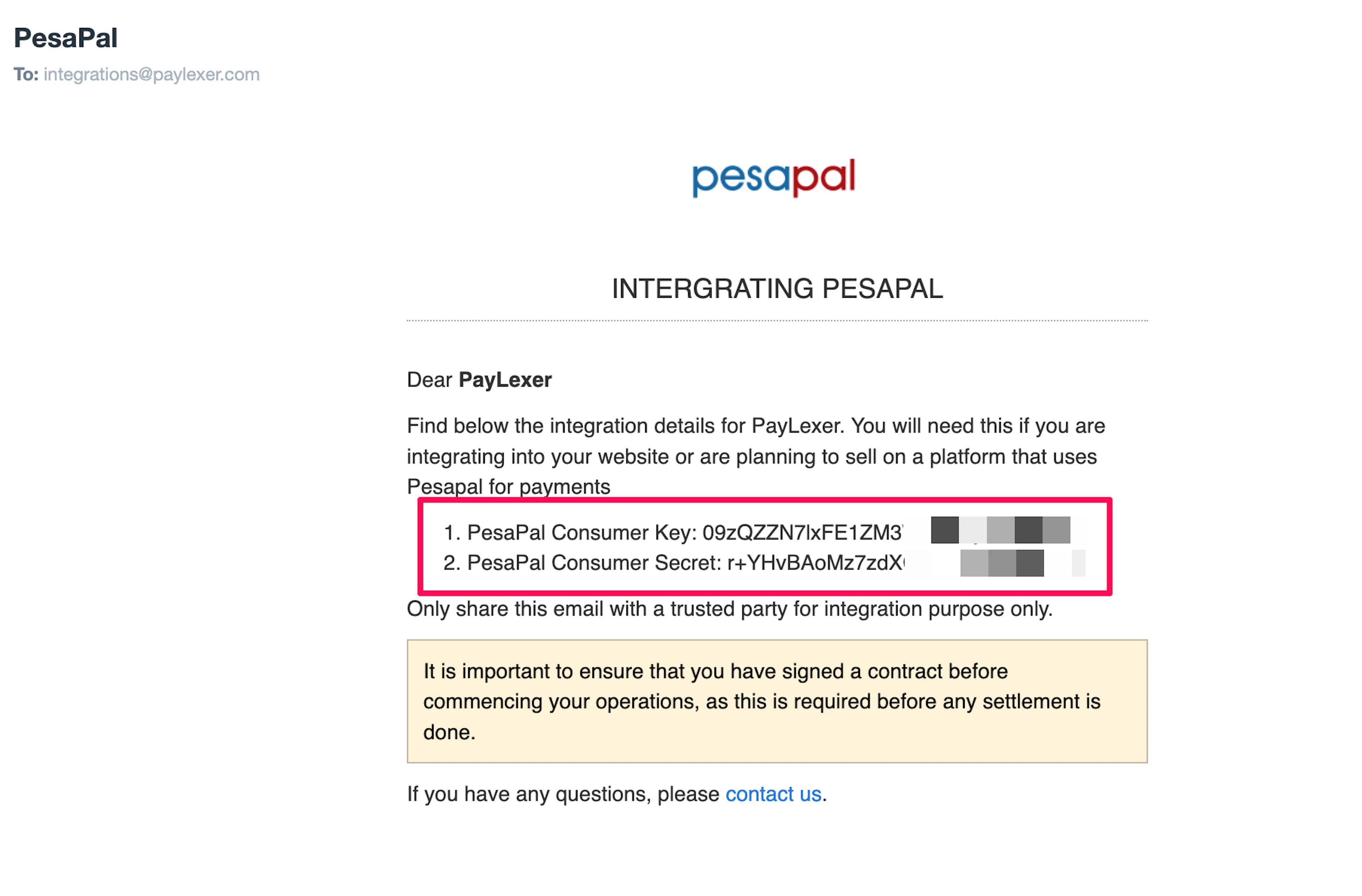
PesaPal provides separate credentials for Demo (sandbox) and Live environments.
Adding Credentials to PayLexer
Open PayLexer Dashboard
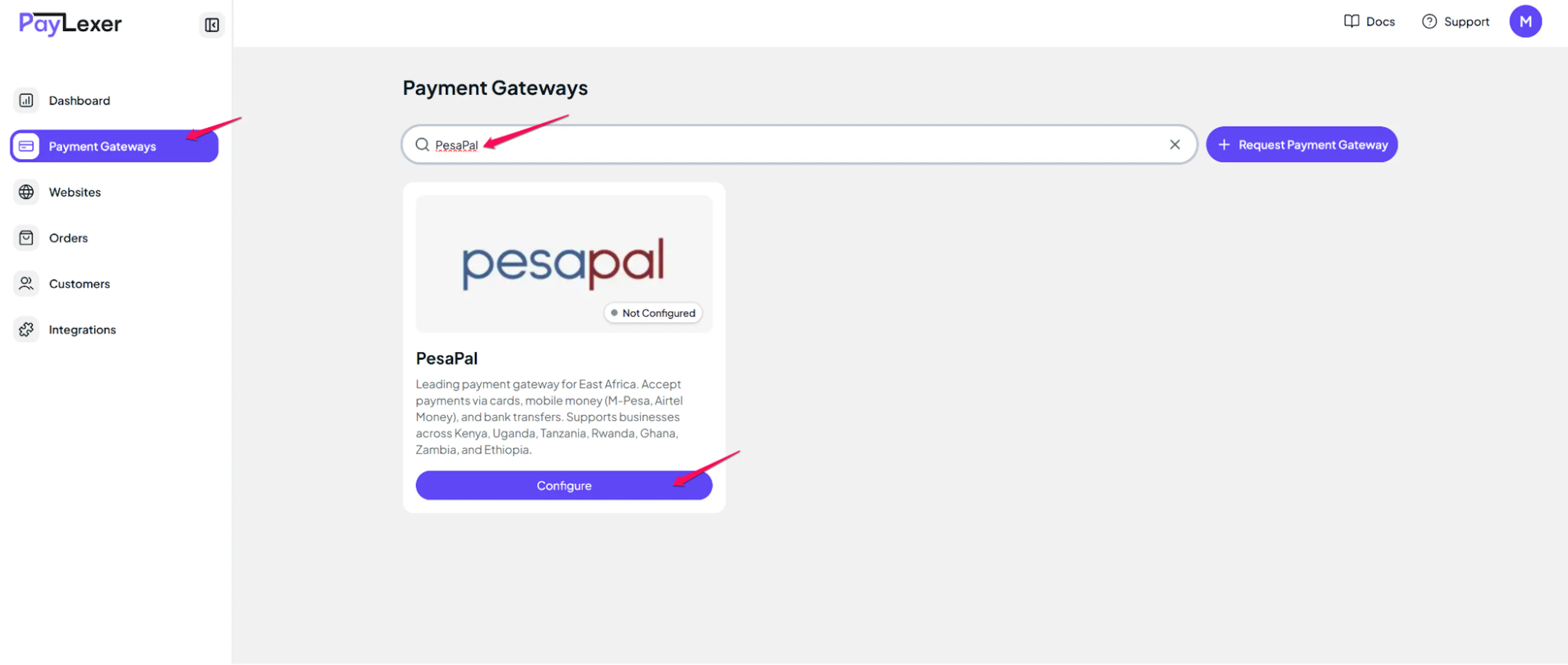
Log in to your PayLexer dashboard and navigate to Payment Gateways → PesaPal.
Enter your credentials
Paste the Consumer Key and Consumer Secret you copied from PesaPal and click Get IPN ID.
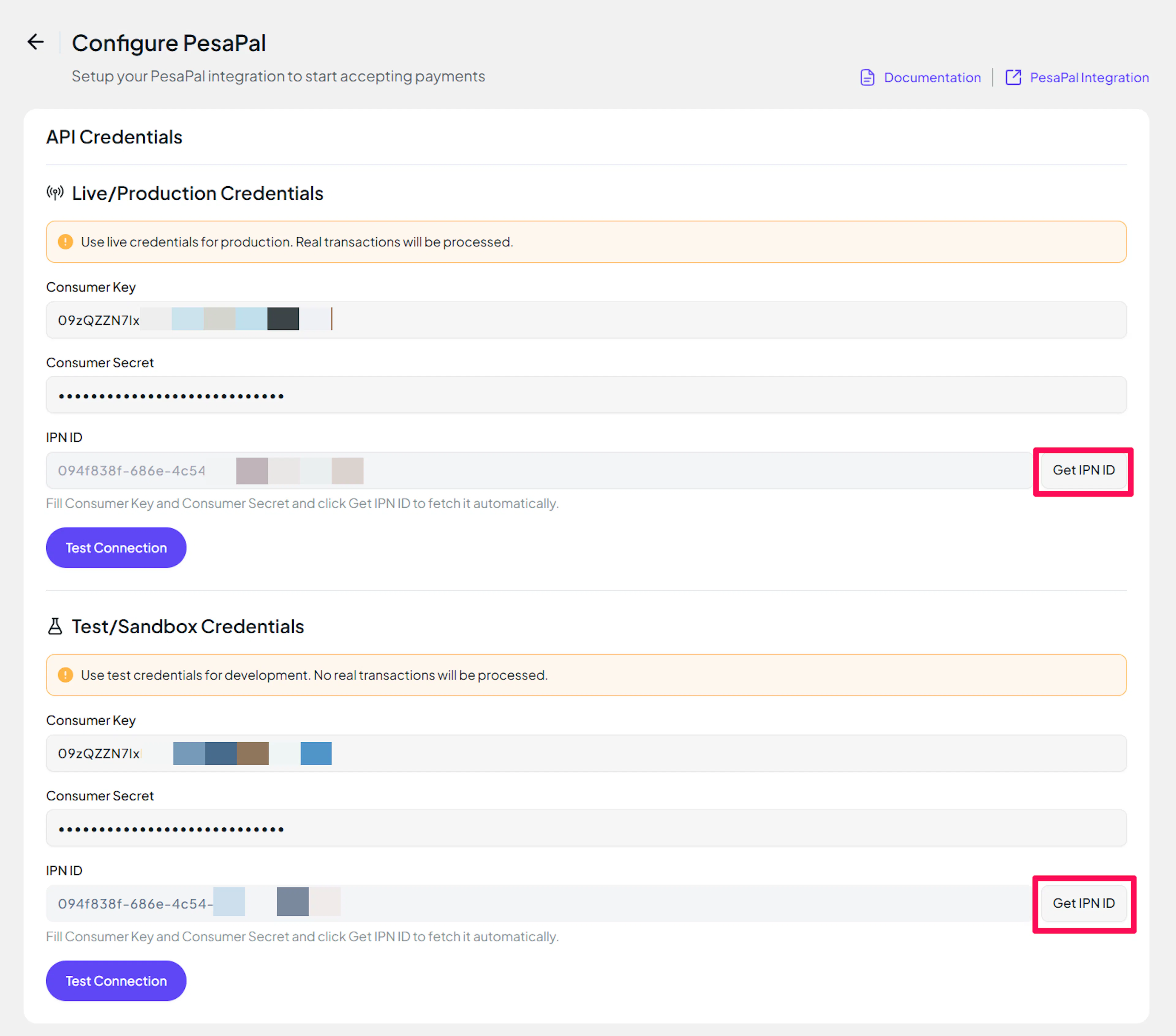
Understanding Live/Production and Sandbox Settings:
| Environment | Purpose |
|---|---|
| Live / Production (Mandatory) | Used for real transactions. Cannot be empty, even when testing. |
| Test / Sandbox (Optional) | Used for testing only. No real money is processed. |
How PayLexer selects credentials:
- Debug/Test mode ON → Test credentials are used
- Debug/Test mode OFF → Live credentials are used
Test and save
Click Test Connection to verify your credentials, then click Save Configuration.
Understanding IPN (Webhooks)
IPN (Instant Payment Notification) is PesaPal's webhook mechanism for real-time payment updates.
Benefits of Webhooks
- Instant payment status updates
- Automatic refund processing
- Real-time mobile money transaction notifications
- Payment confirmation for M-Pesa and other mobile wallets
How IPN Works
PesaPal sends Instant Payment Notifications (IPN) to notify your system about events such as:
- Payment completion
- Payment failure
- Refund updates
- Mobile money confirmation
PesaPal does not use traditional webhook secrets. Verification is handled through your Consumer Key and Consumer Secret, so no separate webhook secret is required.
IPN is environment-specific. You have separate IPN Notification IDs for Demo and Live environments. PayLexer automatically creates and registers the IPN URL with PesaPal when you click "Get IPN ID" - this is why the IPN ID field is located in the API Credentials section alongside your Consumer Key and Consumer Secret (all three are environment-specific credentials).
Integrate PesaPal to Your Website
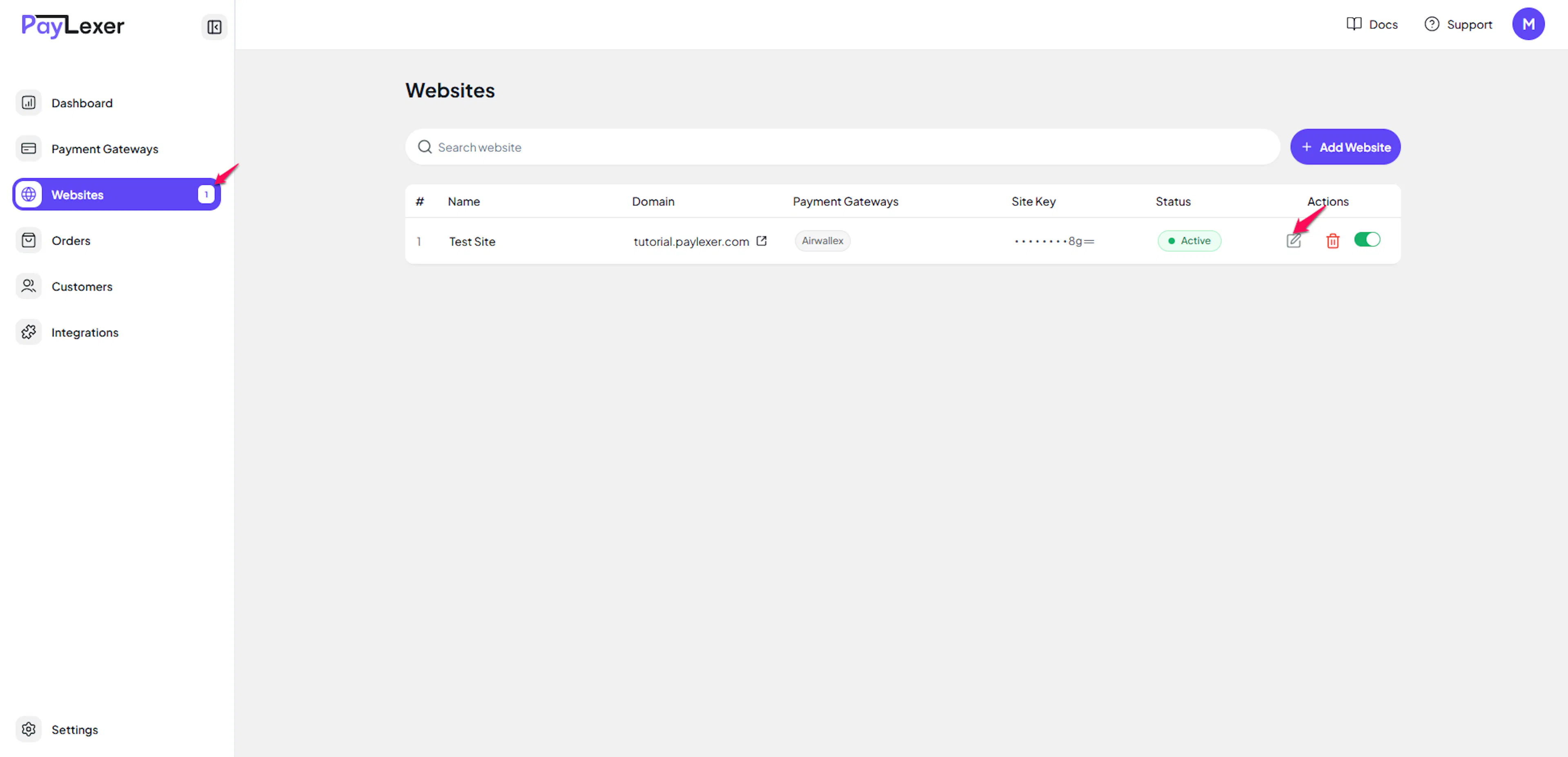
Go to Websites
Navigate to Websites in your PayLexer dashboard.
Edit your website
Click the Edit Icon of your added website.
Enable PesaPal
Click the checkbox to enable PesaPal for the website.
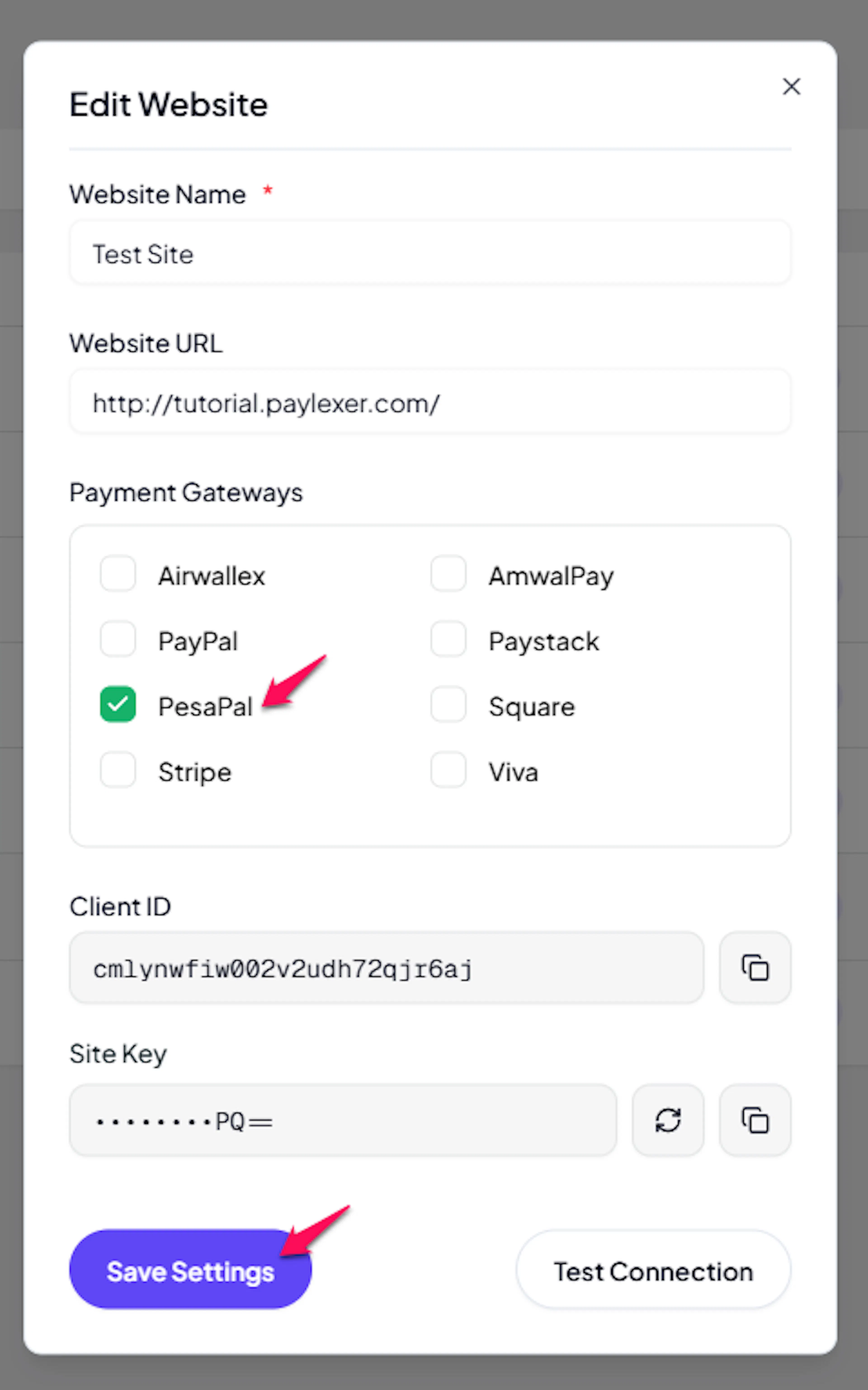
If you haven't added a website yet, Continue to Add Your Website →
Troubleshooting
Best Practices
- Test in Demo mode before enabling Live mode
- Validate the first live transaction
- Confirm IPN webhooks are working
- Keep Consumer Secret secure
- Use separate Demo and Live credentials
FAQs
Still Have Questions?
- PesaPal Support: PesaPal Help Center
- PayLexer Support: Contact Support