

Transbank
Connect Transbank to PayLexer to accept Chilean credit and Redcompra debit card payments in Chilean pesos through Webpay Plus, Transbank's hosted payment page.
Transbank is Chile's principal card acquirer, headquartered in Santiago, and is the default way a Chilean business accepts card payments online. Its e-commerce product, Webpay Plus, sends the shopper to Transbank's own hosted payment page to pay with a Chilean credit card or a Redcompra debit card, then returns them to your store. PayLexer confirms every payment directly with Transbank rather than trusting the shopper's browser, and automatically recovers payments where the shopper never made it back.
- Supported Regions (Merchant Accounts): Chile
- Supported Currencies: CLP
Transbank processes Chilean pesos (CLP) only. Payments in any other currency are rejected. CLP is a zero-decimal currency, so amounts are whole pesos with no cents.
Supported Features
- Hosted Webpay Plus payment page that handles all card entry and bank authentication
- Chilean credit card payments
- Redcompra debit card payments with bank authentication
- Server-side confirmation of every payment directly with Transbank
- Automatic recovery of payments where the shopper never returned to your store
- Full and partial refunds processed directly from PayLexer
- Automatic detection of refunds issued in Transbank's own dashboard
Before You Start
Make sure you have:
- Transbank Account – Don't have one? Sign up for Transbank →
- PayLexer Account – Required to configure the integration. Create your account →
- A website where you want to integrate
Looking for a different payment processor? View all supported gateways →
Configuring Transbank
You need a Commerce Code and API Key Secret from Transbank for this integration.
Getting API Credentials
Use the integration credentials for testing
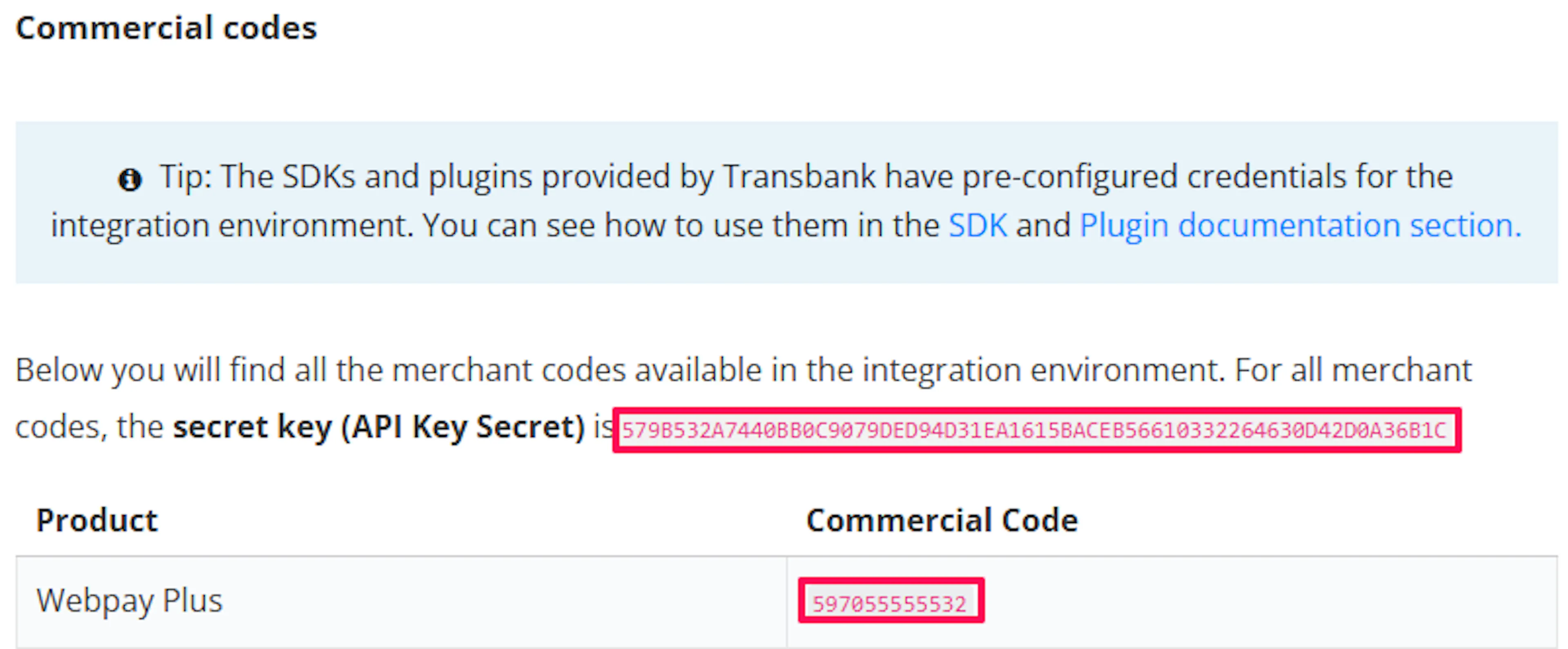
Transbank publishes shared credentials for its integration environment, so you can test without a contract. Copy the Webpay Plus integration Commerce Code and API Key Secret from the Transbank Developers commerce codes page.
Request production credentials from Transbank
Production credentials are issued only to contracted Chilean merchants, and only after you complete Transbank's own integration validation process. Start this from the Transbank merchant portal.
Copy your Commerce Code
Your production Commerce Code (código de comercio) is a 12-digit number that begins with 5970. Transbank provides it when your Webpay Plus contract is activated.
Copy your API Key Secret
Copy the API Key Secret issued alongside your production commerce code.
The API Key Secret is the credential that authorises charges and refunds on your account. Store it securely and never expose it in client-side code.
Adding Credentials to PayLexer
Open PayLexer Dashboard
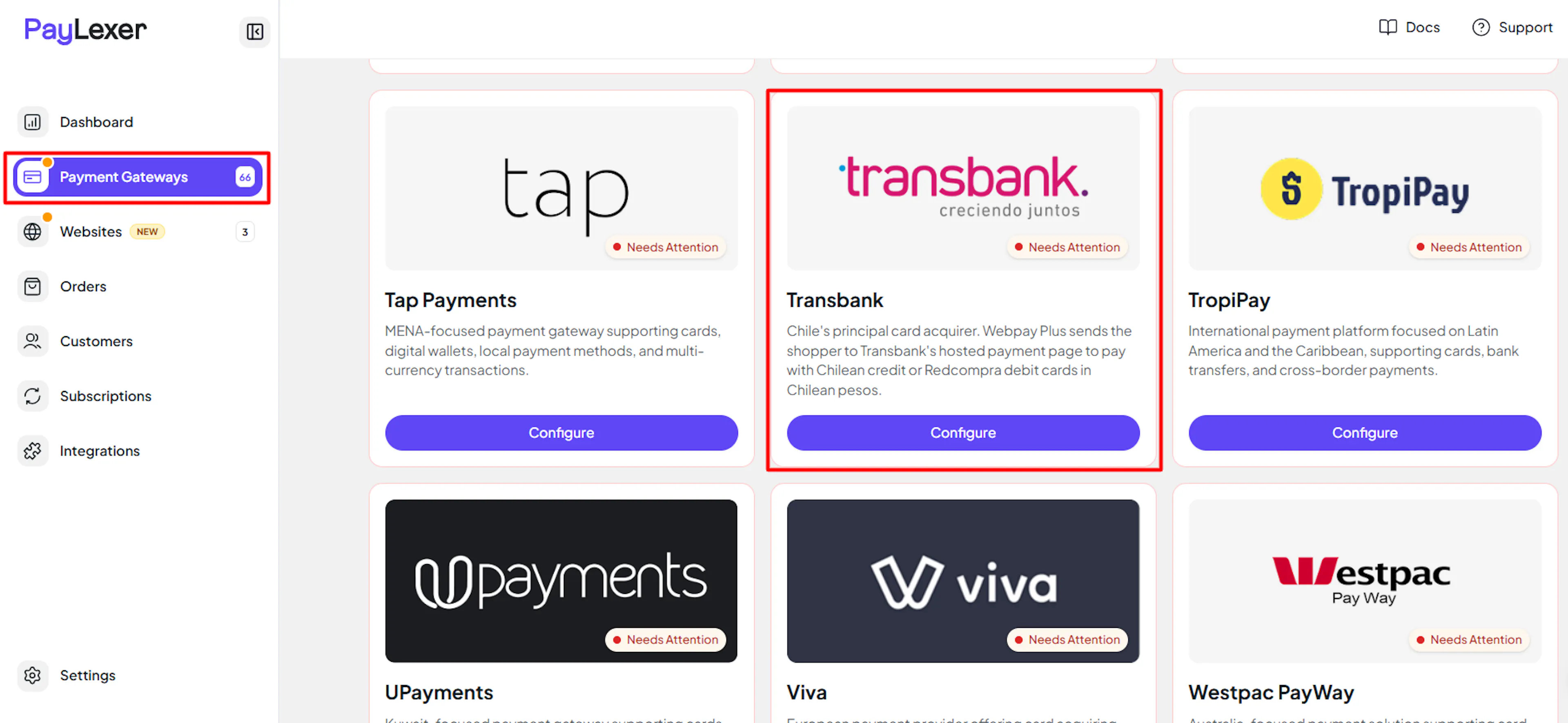
Log in to your PayLexer dashboard and navigate to Payment Gateways -> Transbank.
Enter your credentials
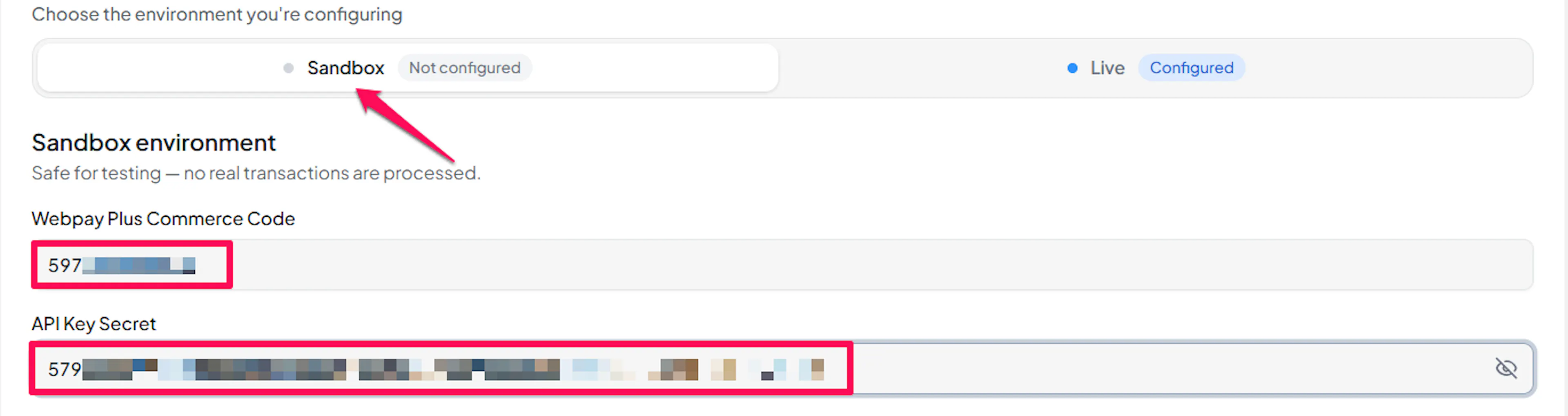
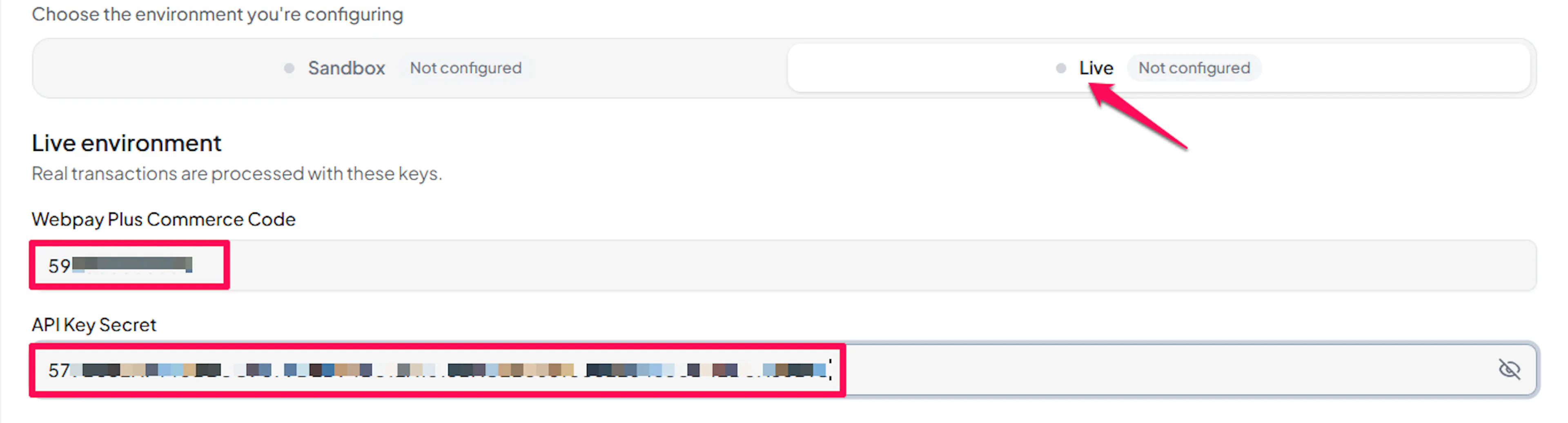
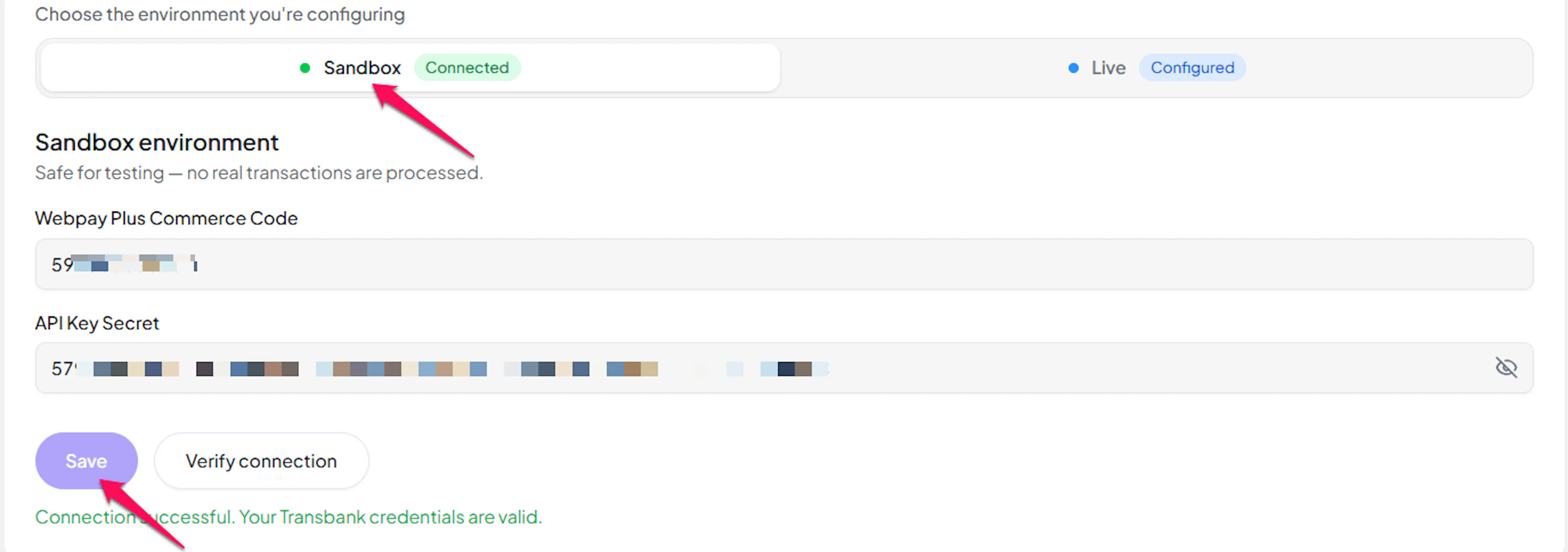
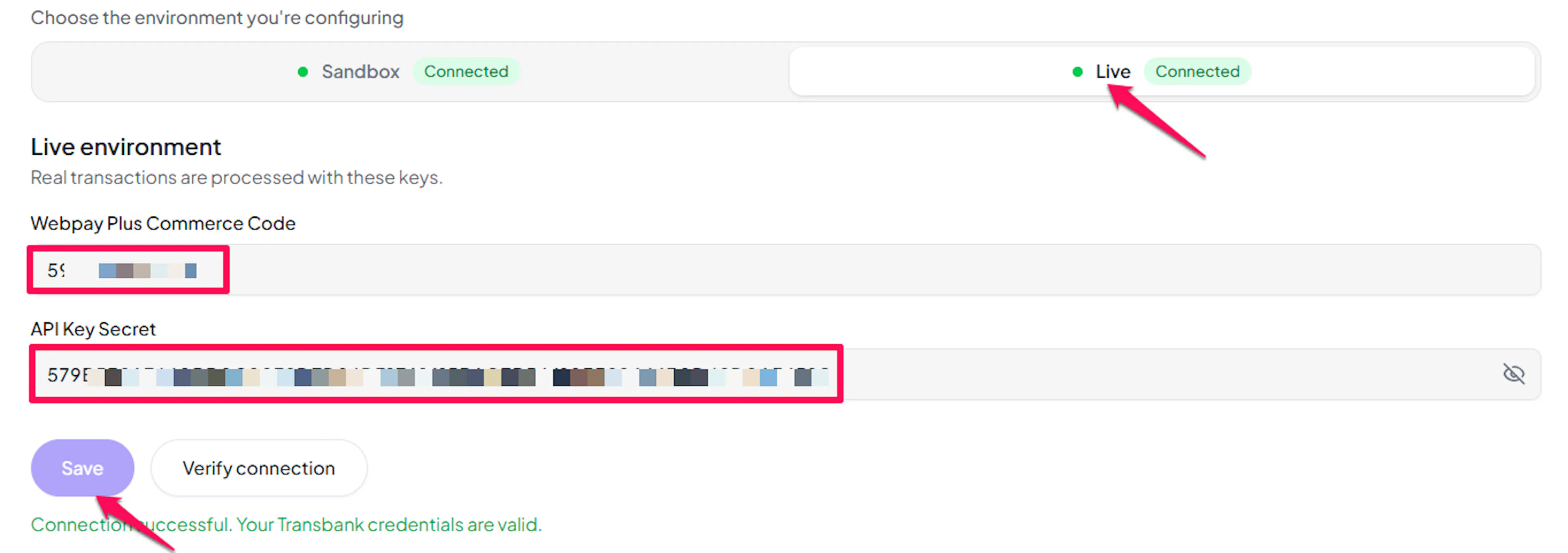
Paste the Commerce Code and API Key Secret you copied from Transbank.
Understanding Live/Production and Sandbox Settings:
| Environment | Purpose |
|---|---|
| Live / Production (Mandatory) | Used for real transactions. Cannot be empty, even when testing. |
| Test / Sandbox (Optional) | Used for testing only. No real money is processed. |
How PayLexer selects credentials:
- Debug/Test mode ON → Test credentials are used
- Debug/Test mode OFF → Live credentials are used
Transbank's integration and production environments are separate systems on different hosts, and a commerce code carries no marker saying which one it belongs to. Make sure integration credentials go in the Test fields and production credentials in the Live fields.
Test and save
Click Save to save your configuration and verify your credentials. Click Verify Connection to test the connection
Webhooks (Not Supported)
Transbank does not currently support webhook integration.
- Payment updates are handled directly within Transbank's processing flow
- Real-time event notifications are not available
- Payment status updates occur through standard API polling
This means payment confirmations may take slightly longer to appear compared to gateways that support webhooks.
Transbank publishes no webhooks for any of its products, so there is nothing to configure here and PayLexer exposes no webhook URL for Transbank. Instead, PayLexer confirms each payment with Transbank the moment the shopper returns, and runs an automatic recurring check that resolves any payment whose outcome was never learned, such as when a shopper closed the tab or lost signal on the way back.
Integrate Transbank to Your Website
If you have already added and configured your site, you can enable Transbank in your existing setup.
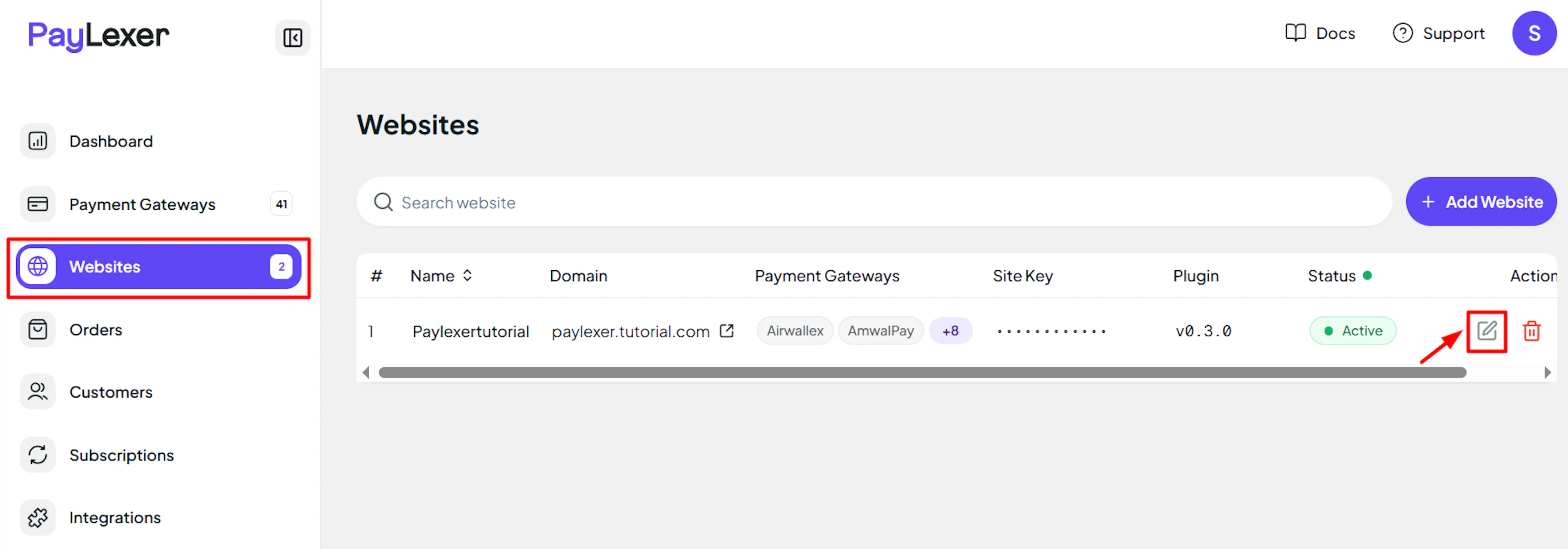
Go to Websites
Navigate to Websites in your PayLexer dashboard.
Edit your website
Click the Edit Icon of your added website.
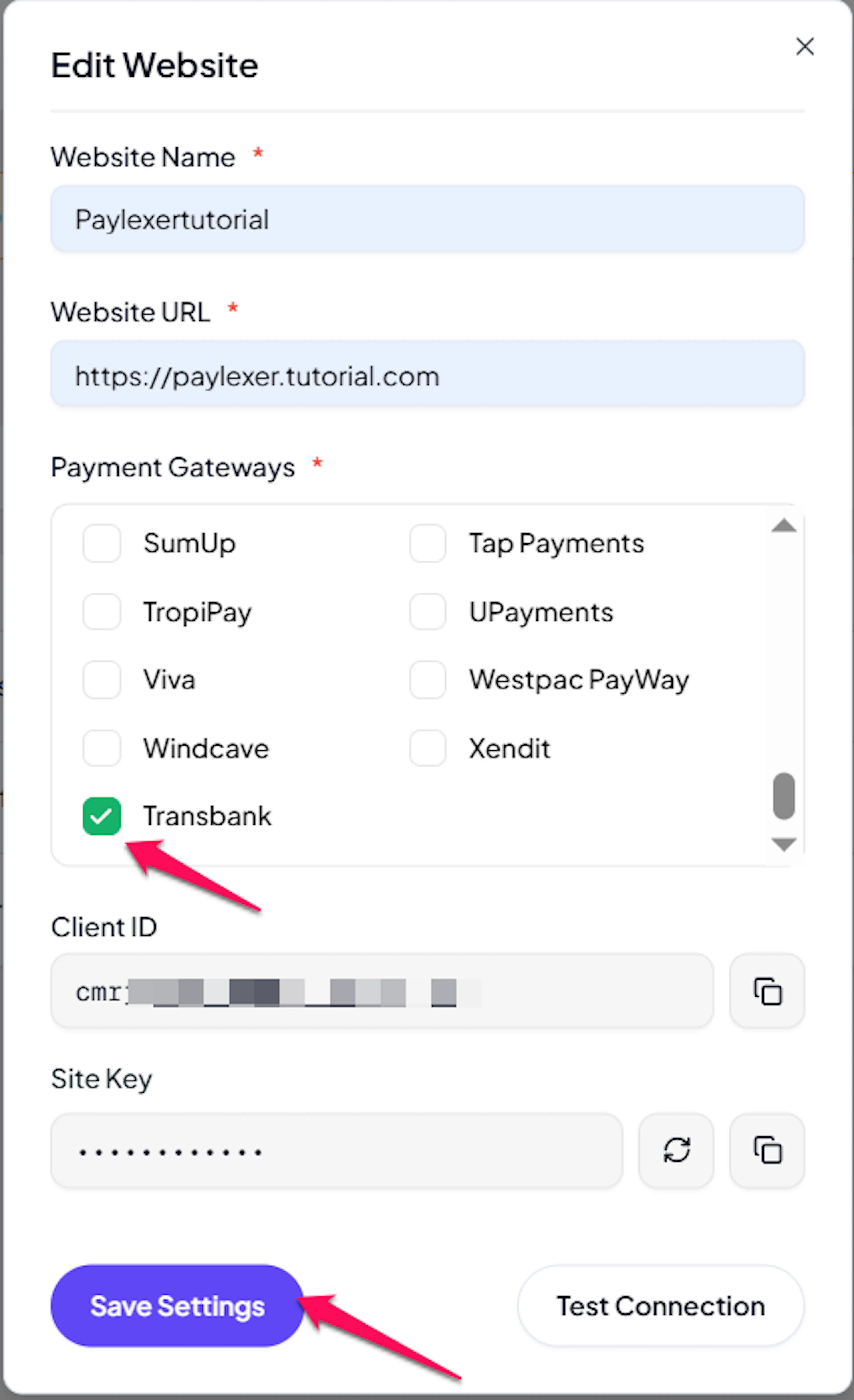
Enable Transbank
Click the checkbox to enable Transbank for the website.
If you haven't added a website yet, Continue to Add Your Website →
Troubleshooting
Best Practices
- Test in sandbox before enabling production. Use Transbank's integration commerce code and their published test cards to complete a full payment before switching to live.
- Keep your API Key Secret confidential and request a replacement from Transbank if you suspect it has been exposed.
- Enter amounts as whole Chilean pesos. An amount of 5000 means five thousand pesos, and getting this wrong is a 100x error in either direction.
- Expect Redcompra debit payments to take longer and be abandoned more often, since the shopper is sent through their bank's authentication.
- Start Transbank's integration validation process early, as production credentials are only issued once it is complete.
FAQs
No. This integration is payment-only. Transbank's recurring products do not bill the card on their own schedule, so recurring billing is not available. If you need subscriptions in Chile, pair Transbank with another gateway that supports them.
Still Have Questions?
- Transbank Support: Transbank Support
- PayLexer Support: Contact Support