

Fatora
Connect Fatora to PayLexer to accept card payments through a hosted checkout for Qatar-based merchants and customers worldwide.
Fatora is a Qatar-based payment gateway that lets merchants accept card payments through a hosted checkout page. Shoppers are redirected to Fatora's secure payment page, keeping sensitive card data entirely within Fatora's systems. Through PayLexer, Fatora supports one-time payments for merchants serving customers in Qatar and internationally.
- Supported Regions (Merchant Accounts): Qatar
- Supported Currencies: QAR, USD, EUR, AUD, MYR, TRY, and major Arabic currencies
Supported Features
- Card payments via Fatora's hosted checkout
- QAR and USD settle natively; EUR, AUD, MYR, TRY, and major Arabic currencies are converted to USD at checkout
- QAR orders support credit and debit cards; all other currencies support credit cards only
- Test and Live environments via a single account (switch modes in Fatora's Integration settings)
- Pending payments are automatically reconciled if a shopper closes the tab before returning - PayLexer polls Fatora every 30 minutes to catch unresolved payments
Before You Start
Make sure you have:
- Fatora Account - Don't have one? Sign up for Fatora →
- PayLexer Account - Required to configure the integration. Create your account →
- A website where you want to integrate
Looking for a different payment processor? View all supported gateways →
Configuring Fatora
You need an API Key from Fatora for this integration.
Getting API Credentials
Find your API Key in Fatora
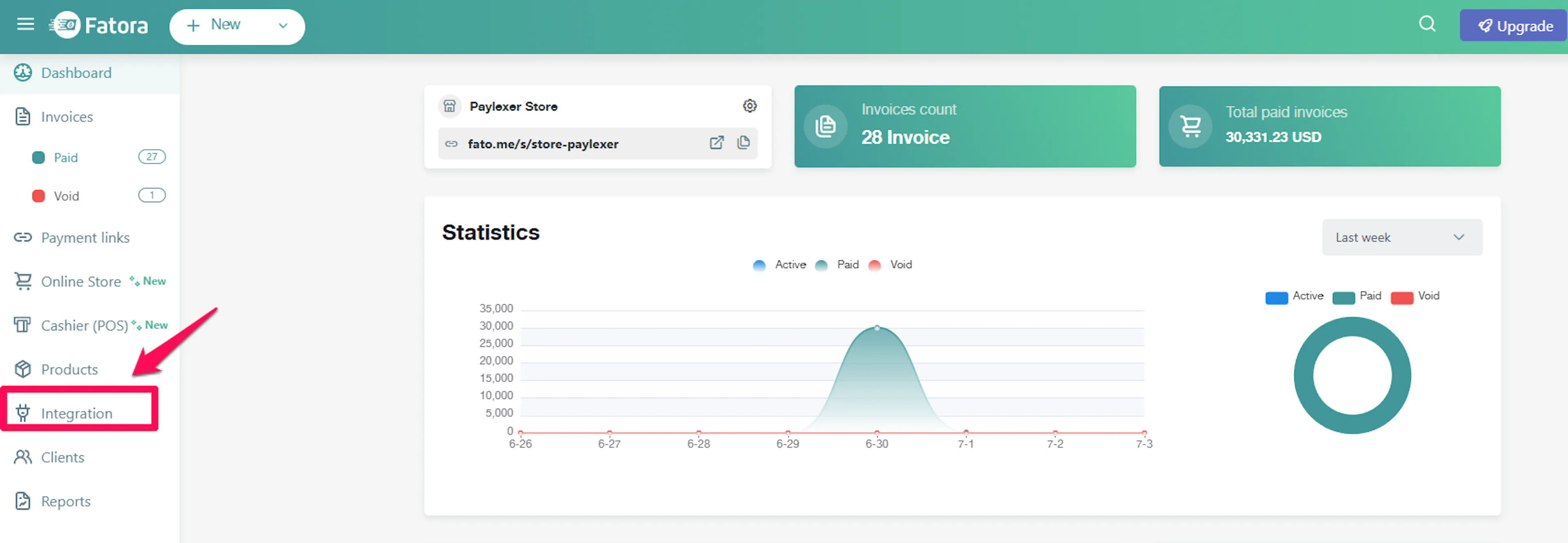
Log in to your Fatora merchant portal and navigate to Integration in the sidebar.
Your API Key is listed on this page. Copy it - you will need it in the next step.
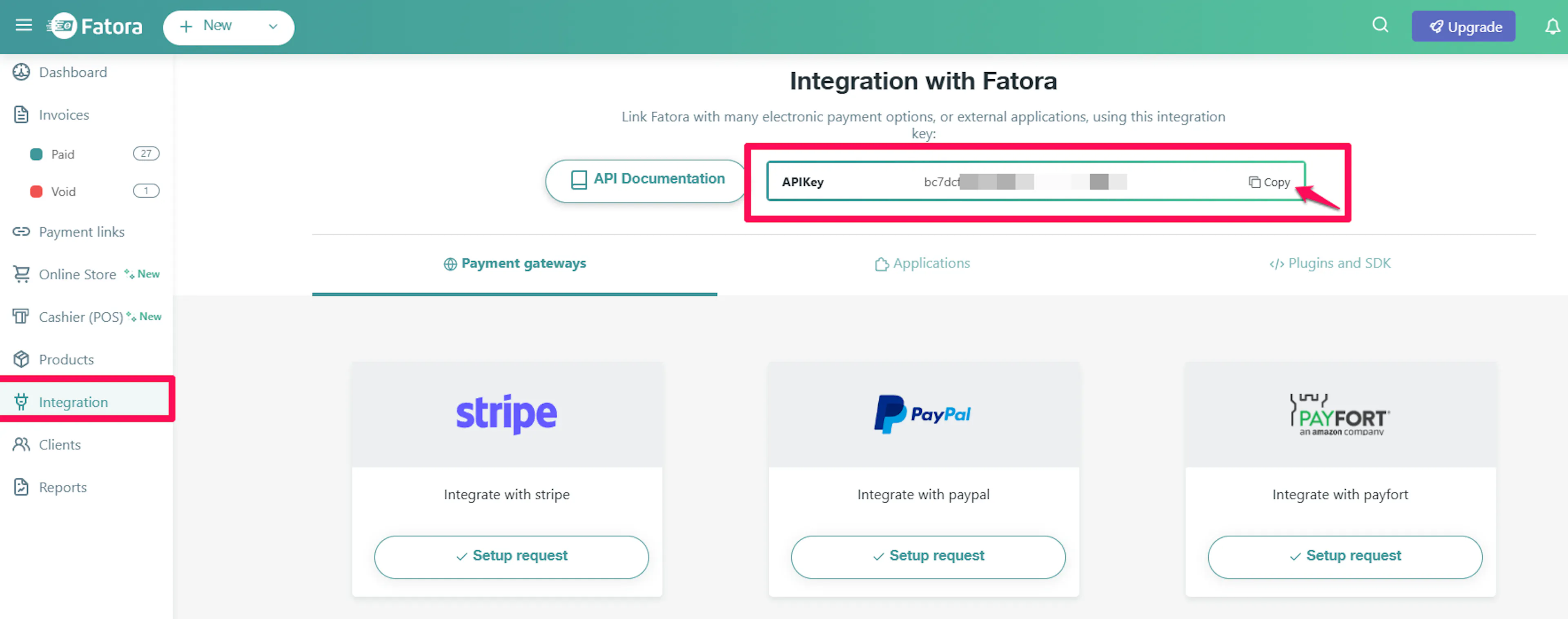
New Fatora accounts start in Test mode. The API Key shown in the Integration page is your test key. To enable live payments, go to Integration → Settings in your Fatora portal and upgrade your account. Once upgraded, copy the live API Key from the same Integration page.
Adding Credentials to PayLexer
Open PayLexer Dashboard
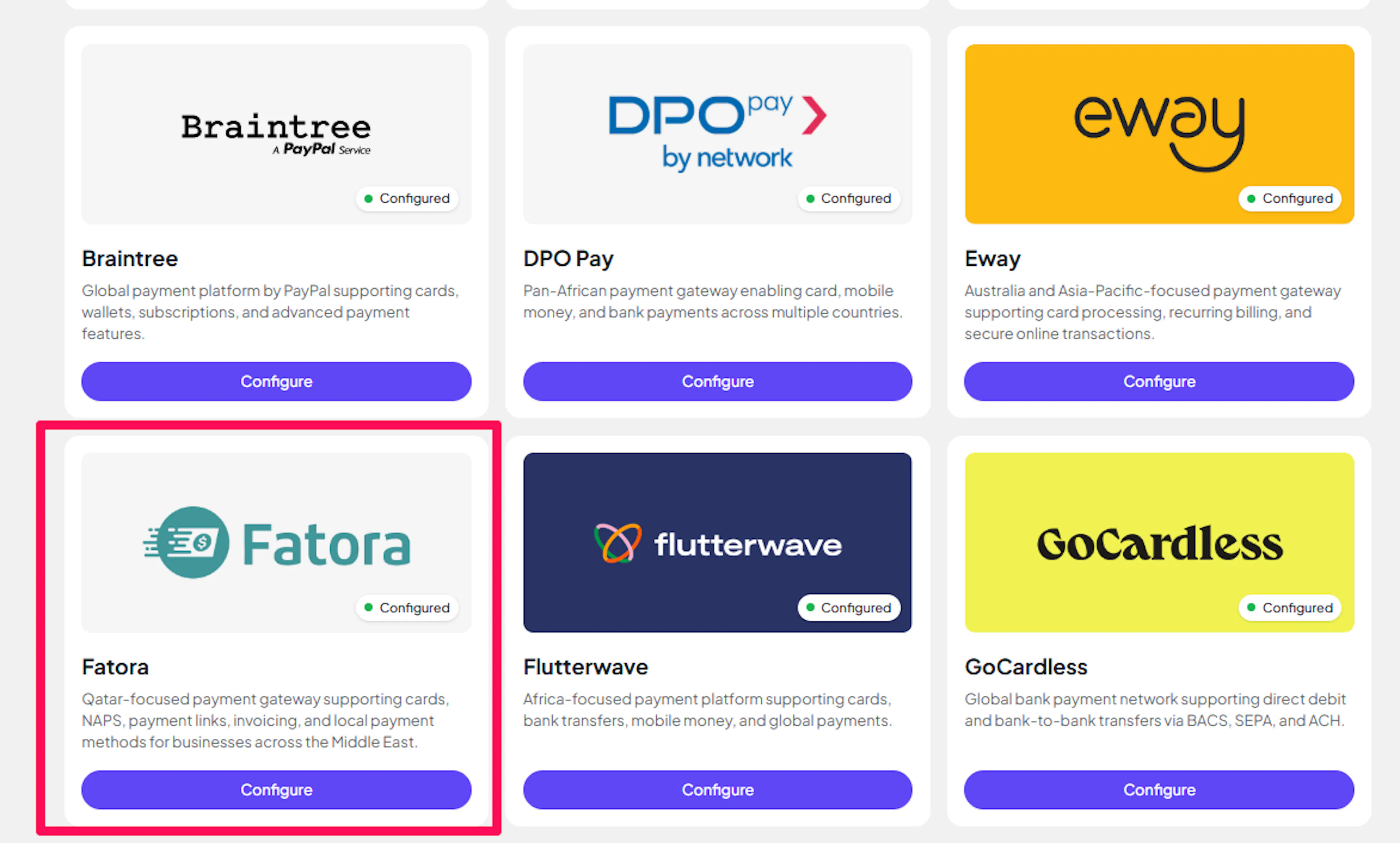
Log in to your PayLexer dashboard and navigate to Payment Gateways → Fatora.
Enter your credentials
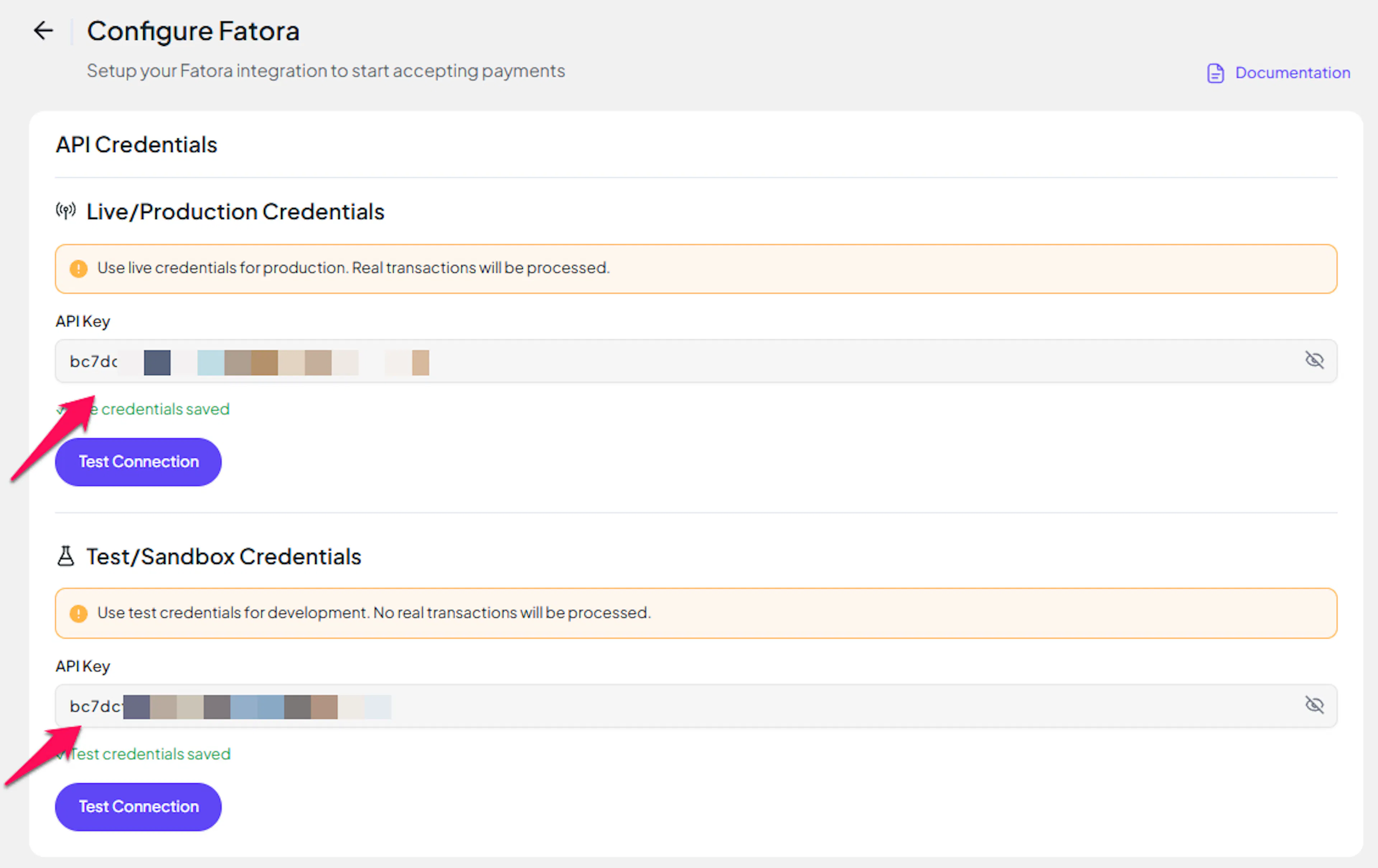
Paste your Live and Test API Keys into the respective fields:
- API Key - the API Key from your Fatora account after upgrading to live mode
- API Key (Test) - the API Key from your Fatora account in test mode
Understanding Live/Production and Sandbox Settings:
| Environment | Purpose |
|---|---|
| Live / Production (Mandatory) | Used for real transactions. Cannot be empty, even when testing. |
| Test / Sandbox (Optional) | Used for testing only. No real money is processed. |
How PayLexer selects credentials:
- Debug/Test mode ON → Test credentials are used
- Debug/Test mode OFF → Live credentials are used
Test and save
Click Test Connection to verify your credentials, then click Save Configuration.
Credentials saved. You can now enable Fatora on any of your websites.
Webhooks (Not Supported)
Fatora does not send inbound webhook notifications to PayLexer.
- Payment status is confirmed at the moment the shopper returns from Fatora's checkout page
- If a shopper closes the tab before returning, PayLexer automatically re-checks any pending Fatora orders every 30 minutes until they resolve
- No webhook configuration is required in Fatora's portal
This means payment confirmations may take slightly longer to appear compared to gateways that support webhooks. In practice, most payments resolve on shopper return; the 30-minute poller handles any that do not.
Integrate Fatora to Your Website
If you have already added and configured your site, you can enable Fatora in your existing setup.
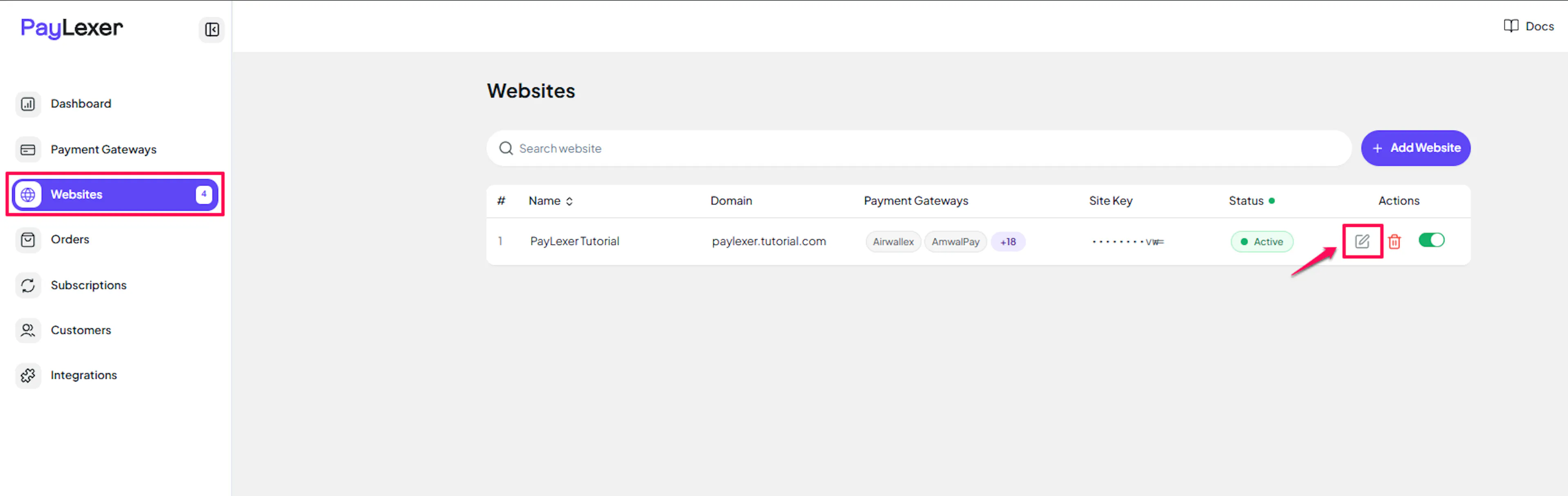
Go to Websites
Navigate to Websites in your PayLexer dashboard.
Edit your website
Click the Edit Icon of your added website.
Enable Fatora
Click the checkbox to enable Fatora for the website.
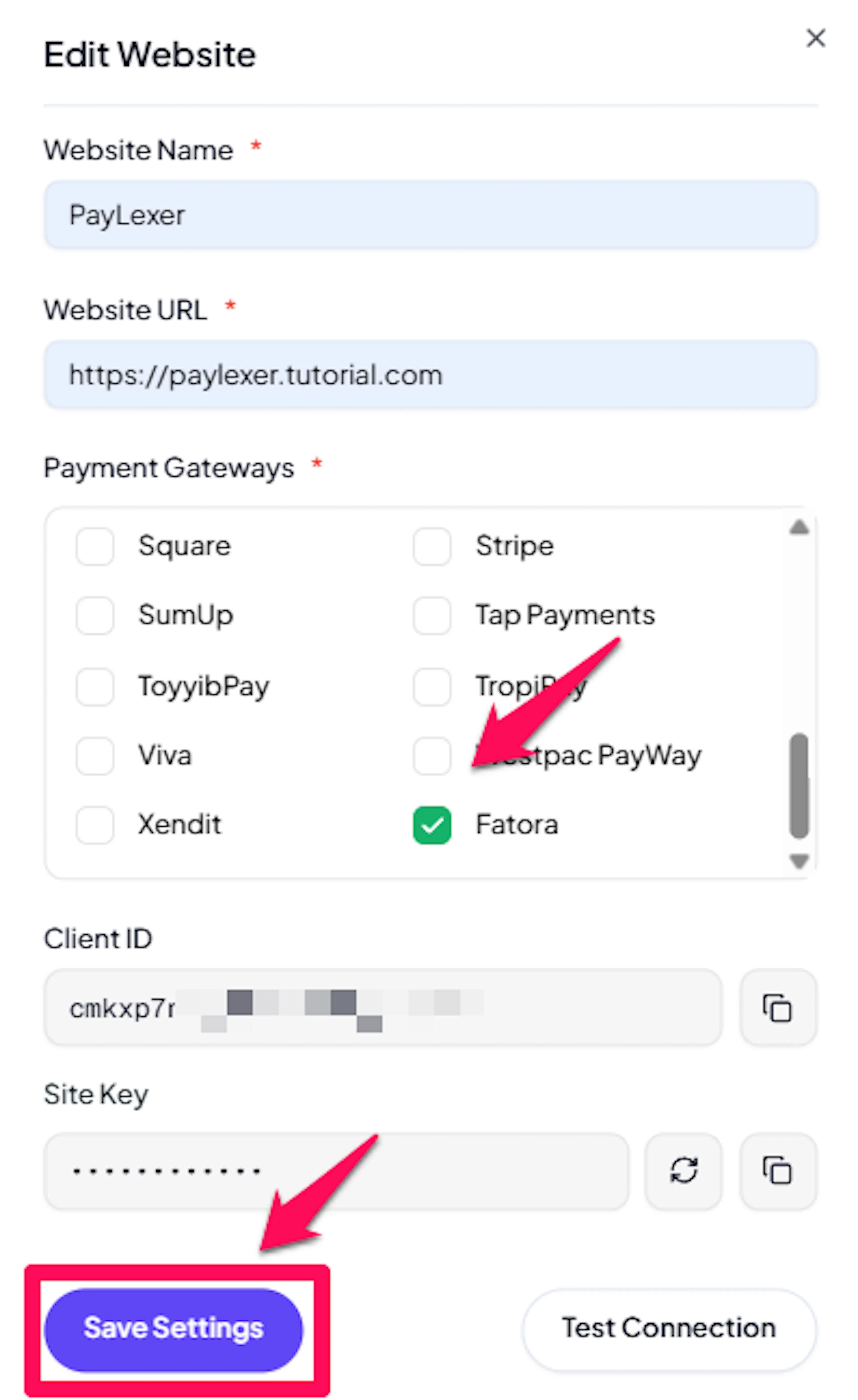
Fatora is now active for this website. Run a test transaction before switching off Debug/Test mode.
If you haven't added a website yet, Continue to Add Your Website →
Troubleshooting
Best Practices
- Run at least one full test transaction before going live. Use your Fatora test account API Key in PayLexer's Test field so no real money is processed.
- Keep your API Key confidential. If it is compromised, generate a new one from your Fatora merchant portal and update it in PayLexer immediately.
- If your target market is Qatar, set your checkout currency to QAR to avoid conversion and give customers the clearest pricing.
- Going live requires upgrading your Fatora account in Integration → Settings, which includes Qatar business verification (commercial registration + Qatari bank account). Start this early to avoid delays when you are ready to launch.
- Pending orders are automatically resolved within 30 minutes by PayLexer's polling service. You do not need to take any manual action for delayed confirmations.
FAQs
Still Have Questions?
- Fatora Support: Fatora Help Center
- PayLexer Support: Contact Support
For API references and advanced configuration, see the Fatora developer documentation.